

Meta Description
Kali Linux is the ultimate cybersecurity operating system. Learn its features, installation process, tools, uses, and beginner tips in this complete guide.
Kali Linux: Complete Beginner’s Guide (2026)
Introduction
Kali Linux is one of the world’s most popular operating systems for cybersecurity professionals, ethical hackers, penetration testers, and IT students. Built on a Debian-based operating system and maintained by Offensive Security, Kali Linux includes hundreds of pre-installed security tools designed for vulnerability assessment, network analysis, digital forensics, malware analysis, and web application security. Whether you are just beginning your cybersecurity journey or already working in information security, learning Kali Linux can significantly improve your technical skills and understanding of modern cyber defense.
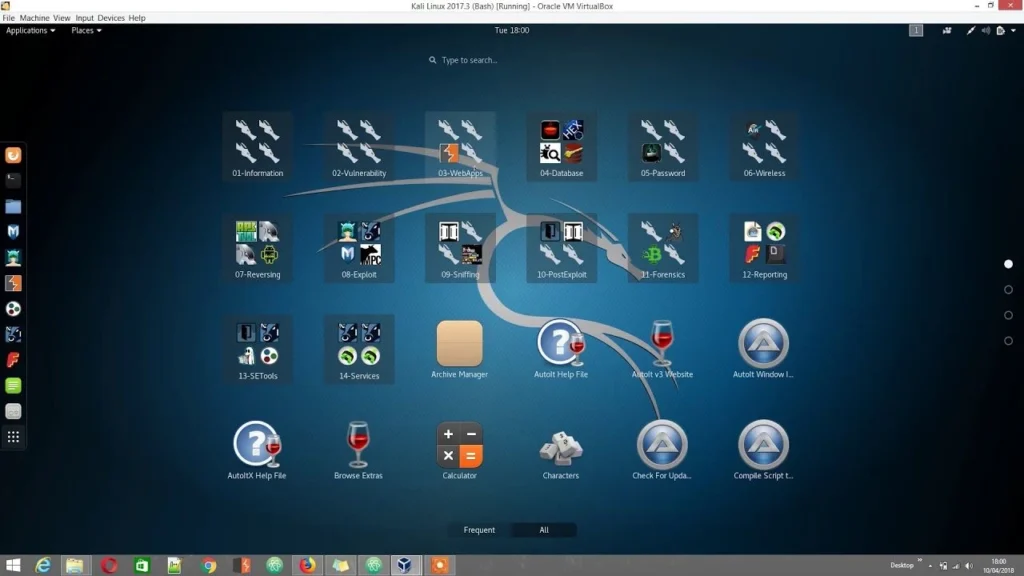
Unlike traditional desktop operating systems, Kali Linux is specifically designed for security testing and ethical hacking. It provides a complete environment for identifying vulnerabilities, auditing systems, testing wireless networks, analyzing traffic, and performing penetration testing in authorized environments. Because it is open source and continuously updated, it has become the preferred Linux distribution for security researchers, bug bounty hunters, red team professionals, and cybersecurity students worldwide.
If you are searching for a Kali Linux tutorial, looking for the best Kali Linux tools, or wondering how to install Kali Linux on Windows 11 or in VirtualBox, this comprehensive guide covers everything you need to know. From system requirements and installation to essential commands and practical use cases, you’ll discover why Kali Linux remains one of the most trusted platforms for cybersecurity learning and professional security testing.
If you’re new to cybersecurity, start by understanding the fundamentals in our Cyber Security guide before exploring Kali Linux.
What Is Kali Linux?
Kali Linux is a specialized Linux distribution developed specifically for cybersecurity, penetration testing, and ethical hacking. It is based on the Debian operating system and comes preloaded with hundreds of security-focused applications that help professionals identify, analyze, and fix security weaknesses before attackers can exploit them.
Kali Linux is officially developed and maintained by Offensive Security, which continuously updates the operating system with the latest security tools.
Unlike standard desktop operating systems that focus on everyday computing tasks, Kali Linux is optimized for security assessments and digital investigations. Instead of downloading dozens of separate security programs, users receive a complete security toolkit immediately after installation. This makes the operating system especially valuable for cybersecurity professionals who regularly perform vulnerability scanning, password auditing, wireless security testing, network monitoring, and web application security assessments.
Another major advantage of Kali Linux is its flexibility. It can run as the primary operating system, inside a virtual machine such as VirtualBox or VMware, from a bootable USB drive, or even within Windows using virtualization technologies. This flexibility allows learners and professionals to practice safely without modifying their primary operating system.
Because Kali Linux is free and open source, thousands of developers contribute improvements, bug fixes, and new security tools. Frequent updates ensure compatibility with modern hardware while keeping the security toolkit current with evolving cybersecurity threats.
History of Kali Linux
Kali Linux was officially released in 2013 as the successor to BackTrack Linux, one of the earliest penetration testing distributions. Offensive Security redesigned the operating system to provide a more secure, stable, and maintainable platform for ethical hacking and professional security testing.
Since its first release, Kali Linux has evolved rapidly with improved hardware support, rolling updates, enhanced documentation, ARM compatibility, cloud images, and dedicated versions for Raspberry Pi and mobile devices. These improvements have helped Kali Linux remain the industry standard for penetration testing.

Who Developed Kali Linux?
Kali Linux is developed and maintained by Offensive Security, a globally respected cybersecurity company known for its penetration testing training and professional certifications. Offensive Security continuously updates Kali Linux with new features, security patches, and improvements while ensuring compatibility with modern security tools.
The operating system also benefits from a strong open-source community. Developers worldwide contribute bug fixes, new packages, documentation, and feature enhancements, making Kali Linux one of the most actively maintained cybersecurity distributions available today.
Features of Kali Linux
Kali Linux stands out because it is designed specifically for cybersecurity rather than general-purpose computing. It combines powerful security tools with a stable Linux foundation, allowing professionals to perform nearly every stage of penetration testing from a single operating system.
Its modular architecture, frequent updates, and extensive documentation make it suitable for both beginners and experienced cybersecurity experts. Whether testing web applications, auditing wireless networks, analyzing malware, or performing digital forensics, Kali Linux provides an efficient and reliable working environment.
Open Source
One of the biggest strengths of Kali Linux is that it is completely open source. Anyone can download, inspect, modify, and improve the operating system without licensing fees. This transparency increases trust because users can review the underlying code and understand how the system operates.
The open-source model also encourages innovation. Security researchers worldwide contribute improvements, report bugs, and develop new features, ensuring Kali Linux remains current with emerging cybersecurity trends and technologies.
Security Focused
Unlike traditional Linux distributions, Kali Linux is built specifically for cybersecurity professionals. Every component is optimized for security testing, vulnerability assessment, digital investigations, and penetration testing.
The operating system includes secure default configurations, rapid security updates, and carefully selected software packages. These features help professionals conduct ethical hacking engagements efficiently while maintaining system stability and reliability.
Hundreds of Built-in Tools
Kali Linux includes more than 600 specialized cybersecurity tools covering virtually every area of information security. Users have immediate access to applications for network scanning, password auditing, wireless security testing, vulnerability assessment, malware analysis, reverse engineering, digital forensics, web application testing, and exploit development.
Instead of spending hours installing individual programs, security professionals can begin testing immediately after installation. This integrated toolkit saves time and ensures compatibility between different applications.
Live Boot Support
Kali Linux supports Live Boot functionality, allowing users to run the operating system directly from a USB drive without installing it on the computer. This feature is especially useful for incident response, forensic investigations, temporary security assessments, and hardware compatibility testing.
Live Boot also enables beginners to explore Kali Linux safely before committing to a permanent installation. Since no changes are made to the primary operating system, users can experiment without affecting existing files or software.
Why Use Kali Linux?
Kali Linux has become the preferred platform for cybersecurity professionals because it combines powerful security tools with a stable and highly customizable operating system. Organizations, educational institutions, and independent researchers rely on Kali Linux to identify vulnerabilities before malicious attackers can exploit them.
Learning Kali Linux also provides valuable career opportunities. Employers increasingly seek professionals with practical knowledge of Linux commands, penetration testing methodologies, vulnerability scanning, and cybersecurity operations. Mastering Kali Linux demonstrates hands-on technical skills that are highly valued in cybersecurity roles.
Kali Linux is one of the most popular operating systems used by professionals working in Ethical Hacking and penetration testing.
Penetration Testing
Penetration testing is one of the primary reasons professionals use Kali Linux. Ethical hackers simulate real-world cyberattacks against authorized systems to discover weaknesses before criminals do.
By identifying vulnerabilities early, organizations can strengthen their defenses, reduce security risks, and comply with industry security standards. Kali Linux simplifies this process by providing a complete penetration testing environment with powerful assessment tools.
Ethical Hacking
Ethical hacking involves legally testing computer systems, networks, and applications to improve security. Kali Linux provides ethical hackers with everything needed to evaluate system defenses while following proper authorization and responsible disclosure practices.
It is important to understand that Kali Linux is intended for legal and authorized testing only. Using its tools against systems without permission may violate laws and organizational policies. Responsible use is essential for maintaining trust and professionalism in cybersecurity.
Kali Linux System Requirements
Before installing Kali Linux, it is important to understand the hardware requirements. Although Kali Linux is lightweight compared to many modern operating systems, the experience you get depends on your system specifications and how you plan to use it. Whether you install Kali Linux on a physical computer, run it in a virtual machine like VirtualBox or VMware, or boot it from a USB drive, having sufficient resources ensures smooth performance.

For beginners learning cybersecurity or ethical hacking, running Kali Linux inside a virtual machine is often the safest option. It allows you to practice penetration testing, vulnerability assessment, and Linux commands without affecting your primary operating system. Professionals who frequently perform security testing may prefer installing Kali Linux directly on dedicated hardware for maximum performance.
Minimum Requirements
Kali Linux can run on relatively modest hardware, making it accessible for students and professionals with older computers. The minimum requirements are suitable for basic learning, command-line tasks, and light penetration testing.
Minimum system requirements include:
- 64-bit processor (x86_64 architecture)
- Dual-core CPU
- 2 GB RAM (4 GB recommended for better performance)
- 20 GB of available storage
- Bootable USB drive (for installation)
- Internet connection for downloading updates and packages
While these specifications are enough to install the operating system, users running multiple security tools simultaneously may experience slower performance.
Recommended Requirements
For the best experience, especially when using advanced penetration testing tools, malware analysis software, or multiple virtual machines, higher specifications are recommended.
Recommended specifications include:
- Quad-core Intel Core i5, AMD Ryzen 5, or better
- 8 GB to 16 GB RAM
- SSD with at least 50 GB free space
- Hardware virtualization support (Intel VT-x or AMD-V)
- Stable broadband internet connection
- Modern graphics hardware (optional for desktop performance)
These specifications allow Kali Linux to handle resource-intensive tasks such as network analysis, password auditing, web application security testing, digital forensics, and virtualization with excellent performance.
How to Install Kali Linux
Installing Kali Linux is straightforward, even for beginners. The operating system supports several installation methods, allowing users to choose the setup that best matches their needs. Some users install Kali Linux as their primary operating system, while others prefer using a virtual machine or dual-boot configuration alongside Windows.
Always download the latest ISO image from the official Kali Linux Downloads page to ensure authenticity and security.
Before starting the installation, always back up important files and verify that your computer meets the recommended hardware requirements. Downloading the correct installation image and preparing your installation media carefully will help prevent common installation problems.
Install on Windows
Many beginners want to learn Kali Linux without replacing Windows. One of the safest approaches is to install Kali Linux alongside Windows using a dual-boot setup or run it inside virtualization software.
A typical installation process includes:
- Download the appropriate Kali Linux ISO image.
- Create a bootable USB drive.
- Boot your computer from the USB drive.
- Start the Kali Linux installer.
- Select your preferred language, region, and keyboard layout.
- Configure partitions according to your installation method.
- Install the operating system.
- Create your user account.
- Complete the installation and restart the computer.
Running Kali Linux alongside Windows gives users access to both operating systems whenever needed.
Install on VirtualBox
VirtualBox is one of the most popular ways to run Kali Linux because it allows users to practice cybersecurity safely without modifying their primary operating system.
The installation process generally involves:
- Installing Oracle VirtualBox.
- Creating a new virtual machine.
- Assigning RAM and storage.
- Mounting the Kali Linux ISO file.
- Starting the virtual machine.
- Following the installation wizard.
- Installing Guest Additions (optional for better performance).
This method is highly recommended for beginners because virtual machines can easily be reset if mistakes occur during learning or experimentation.
Install on VMware
VMware Workstation and VMware Player also provide excellent virtualization performance for Kali Linux. Many cybersecurity professionals prefer VMware because of its advanced networking features and stability.
The installation steps are similar to VirtualBox:
- Create a new virtual machine.
- Select the Kali Linux ISO.
- Allocate CPU cores, RAM, and storage.
- Complete the installation wizard.
- Install VMware Tools for improved display, clipboard sharing, and file transfer.
VMware is particularly useful for building cybersecurity labs with multiple virtual machines communicating over isolated networks.
Dual Boot Installation
A dual-boot setup allows Windows and Kali Linux to coexist on the same computer. During startup, users choose which operating system they want to launch.
Although this provides full hardware performance, beginners should proceed carefully because disk partitioning errors can lead to data loss if proper backups are not created beforehand.
A successful dual-boot installation usually involves:
- Shrinking the Windows partition.
- Creating free disk space.
- Installing Kali Linux into the new partition.
- Configuring the GRUB bootloader.
- Testing both operating systems after installation.
This setup is ideal for users who frequently switch between everyday productivity tasks in Windows and cybersecurity work in Kali Linux.
By choosing the installation method that best fits your needs—whether VirtualBox, VMware, dual boot, or a dedicated installation—you can begin exploring Kali Linux in a safe and efficient environment while developing practical cybersecurity skills.
Best Kali Linux Tools
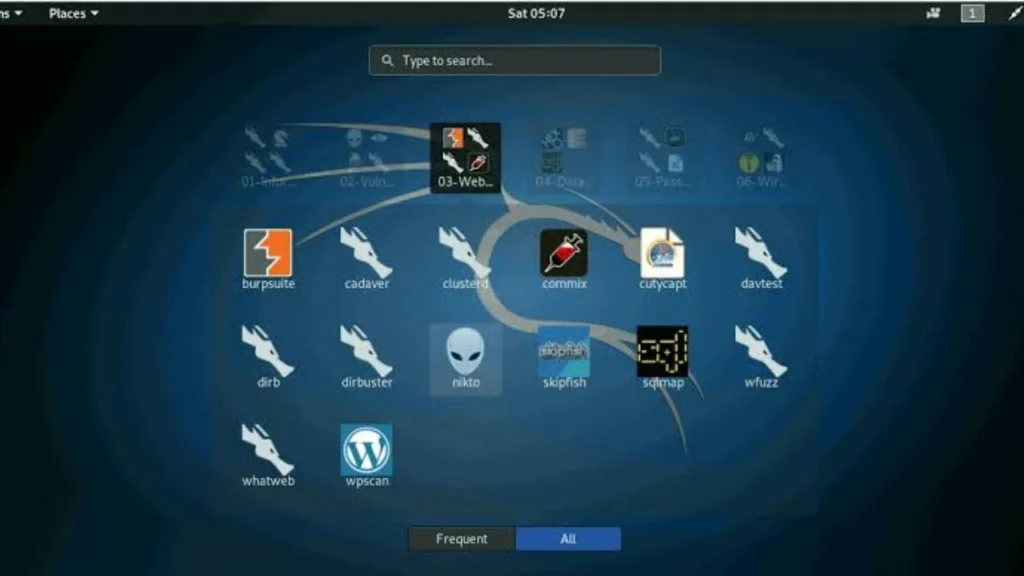
One of the biggest reasons cybersecurity professionals choose Kali Linux is its extensive collection of pre-installed security tools. With more than 600 applications available, Kali Linux provides everything needed for penetration testing, vulnerability assessment, network analysis, web application security, digital forensics, wireless security, and malware analysis. Instead of installing each tool individually, users have immediate access to a complete cybersecurity toolkit after installation.
For beginners, learning every tool at once can feel overwhelming. The best approach is to master a few essential applications first and gradually expand your knowledge. Below are some of the most widely used Kali Linux tools that form the foundation of ethical hacking and penetration testing.
Nmap
Nmap (Network Mapper) is one of the most popular network scanning tools included in Kali Linux. It helps security professionals discover devices connected to a network, identify open ports, detect running services, and determine operating system information.
Nmap is commonly used during the reconnaissance phase of penetration testing. By understanding how systems are configured, ethical hackers can identify potential security weaknesses that require further investigation. It is an essential tool for network administrators and cybersecurity professionals alike.
Want to master network scanning? Read our complete Nmap guide for practical examples and command usage.
Metasploit Framework
The Metasploit Framework is a powerful penetration testing platform used to identify, validate, and demonstrate security vulnerabilities. It allows ethical hackers to simulate attacks in authorized environments, helping organizations understand the real-world impact of security flaws.
Besides exploit testing, Metasploit supports payload generation, post-exploitation modules, and security research. It is widely used by penetration testers to verify vulnerabilities before recommending remediation.
Wireshark
Wireshark is a leading packet analysis tool that captures and examines network traffic in real time. It helps security analysts troubleshoot network issues, investigate suspicious activity, and understand communication between devices.
By analyzing packets, professionals can detect configuration errors, identify malicious traffic, and investigate cybersecurity incidents. Wireshark is also widely used in cybersecurity training because it provides valuable insight into how network protocols function.
Burp Suite
Burp Suite is a comprehensive web application security testing platform. It enables security professionals to inspect HTTP requests and responses, identify vulnerabilities, and assess web application security.
The Community Edition included with Kali Linux provides numerous features for learning web security, while professional versions offer advanced automation capabilities. Burp Suite is especially valuable for testing authentication, session management, and common web vulnerabilities.
Aircrack-ng
Aircrack-ng is a popular wireless security toolkit used to analyze Wi-Fi networks. It supports wireless monitoring, packet capture, and security auditing in authorized environments.
Cybersecurity professionals use Aircrack-ng to evaluate wireless network security and identify configuration weaknesses that could expose organizations to unauthorized access.
John the Ripper
John the Ripper is a password auditing and recovery tool designed to evaluate password strength. Organizations use it to identify weak passwords that may increase security risks.
When used responsibly, John the Ripper helps improve password policies and strengthens organizational security by encouraging stronger authentication practices.
Kali Linux Commands Every Beginner Should Know
Learning Linux commands is one of the most important steps for anyone using Kali Linux. Although the graphical interface is useful, many cybersecurity tasks are performed through the terminal because it offers greater speed, flexibility, and automation. Understanding basic commands also helps users navigate the operating system efficiently and manage files, permissions, and software packages.
Below are some essential commands every beginner should learn:
| Command | Purpose |
| pwd | Displays the current working directory. |
| ls | Lists files and folders in the current directory. |
| cd | Changes the current directory. |
| mkdir | Creates a new directory. |
| cp | Copies files or directories. |
| mv | Moves or renames files. |
| rm | Deletes files or directories. |
| cat | Displays file contents. |
| nano | Opens the Nano text editor. |
| sudo | Executes commands with administrative privileges. |
| apt update | Updates package information. |
| apt upgrade | Installs available software updates. |
| ifconfig or ip a | Displays network configuration. |
| ping | Tests network connectivity. |
| history | Shows previously executed commands. |
Practicing these commands daily helps beginners become comfortable with the Linux terminal. As users gain experience, they can move on to shell scripting, automation, and advanced system administration tasks that are valuable in cybersecurity careers.
Kali Linux vs Ubuntu
Although Kali Linux and Ubuntu are both Debian-based Linux distributions, they are designed for very different purposes. Ubuntu focuses on everyday desktop computing, software development, office productivity, and general home use, while Kali Linux is built specifically for cybersecurity, ethical hacking, penetration testing, and security research.
Ubuntu provides a beginner-friendly experience with a polished desktop environment and a wide range of productivity applications. It is an excellent choice for students, developers, and users who need a reliable operating system for daily tasks.
Kali Linux, on the other hand, includes hundreds of specialized security tools that are not typically found in standard Linux distributions. It is optimized for security testing, vulnerability assessment, digital forensics, wireless security, and network analysis. These capabilities make it the preferred platform for cybersecurity professionals and ethical hackers.
If your goal is learning Linux basics, programming, or office work, Ubuntu is usually the better choice. If you want to develop cybersecurity skills, perform penetration testing, or study ethical hacking, Kali Linux is the ideal option.
Is Kali Linux Safe and Legal?
One of the most common questions asked by beginners is whether Kali Linux is safe and legal. The answer is yes—Kali Linux itself is completely safe and legal to download, install, and use. It is an open-source operating system maintained by Offensive Security and trusted by cybersecurity professionals worldwide.
However, the legality depends entirely on how the tools are used. Kali Linux contains powerful security applications designed for ethical hacking and penetration testing. Using these tools on networks, servers, or websites without authorization may violate laws and organizational policies.
Ethical hacking always requires explicit permission from the system owner. Security professionals perform assessments under contracts or written authorization to help organizations identify and fix vulnerabilities before attackers can exploit them.
For beginners, the safest learning environment is a personal cybersecurity lab using VirtualBox or VMware. Practicing in isolated virtual machines allows users to develop skills responsibly without affecting production systems or unauthorized networks.
Pros and Cons of Kali Linux
Like every operating system, Kali Linux has advantages and limitations. Understanding both helps users determine whether it is the right platform for their needs.
Pros
- Free and open-source operating system.
- More than 600 built-in cybersecurity tools.
- Regular security updates and rolling releases.
- Excellent support for penetration testing and ethical hacking.
- Strong community documentation and learning resources.
- Compatible with VirtualBox, VMware, cloud platforms, and Raspberry Pi.
- Supports digital forensics, malware analysis, and wireless security.
- Highly customizable for advanced users.
Cons
- Not designed for everyday desktop computing.
- Beginners may face a steep learning curve.
- Many tools require Linux command-line knowledge.
- Improper use can create legal and ethical issues.
- Some hardware may require additional driver configuration.
- Advanced penetration testing requires networking and cybersecurity knowledge.
Overall, Kali Linux is an outstanding operating system for cybersecurity professionals, students, and ethical hackers. While it may not replace a standard desktop operating system for everyday tasks, it remains one of the most comprehensive platforms available for learning and practicing modern cybersecurity techniques.
Final Thoughts
Kali Linux has established itself as one of the most trusted operating systems in the cybersecurity industry. Whether you are an aspiring ethical hacker, a cybersecurity student, an IT administrator, or an experienced penetration tester, Kali Linux provides a comprehensive platform for learning and performing security assessments. Its Debian-based architecture, extensive collection of built-in security tools, and continuous updates make it an excellent choice for both beginners and professionals.
One of the greatest advantages of Kali Linux is its flexibility. You can install it as your primary operating system, run it in VirtualBox or VMware, boot it from a USB drive, or configure it in a dual-boot environment alongside Windows. This versatility allows users to practice cybersecurity skills in a way that best suits their hardware and learning preferences.
While Kali Linux includes powerful tools such as Nmap, Metasploit Framework, Wireshark, Burp Suite, Aircrack-ng, Hydra, and John the Ripper, these tools should always be used responsibly. Ethical hacking is based on authorization and legal permission. Using Kali Linux to test networks, websites, or devices without explicit consent may violate laws and organizational policies.
For beginners, the best approach is to start with Linux fundamentals, basic networking concepts, and command-line skills before moving on to advanced penetration testing techniques. Building a virtual lab environment allows you to safely explore vulnerability assessment, password auditing, wireless security testing, malware analysis, and digital forensics without affecting production systems.
As cybersecurity threats continue to evolve, learning Kali Linux remains a valuable investment for anyone interested in information security. With consistent practice, hands-on experience, and a commitment to ethical use, Kali Linux can become one of the most powerful tools in your cybersecurity journey.
To build a strong cybersecurity foundation, explore our complete collection of cybersecurity tutorials and ethical hacking guides.
Frequently Asked Questions (FAQs)
1. What is Kali Linux used for?
Kali Linux is primarily used for penetration testing, ethical hacking, cybersecurity research, vulnerability assessment, digital forensics, malware analysis, wireless security testing, and network security auditing. It includes hundreds of pre-installed tools designed for professional security testing.
2. Is Kali Linux free?
Yes. Kali Linux is completely free and open source. Anyone can download, install, use, and modify it without paying licensing fees. Regular updates and security improvements are also provided at no cost.
3. Is Kali Linux legal?
Yes, Kali Linux is legal to download and use. However, the legality depends on how it is used. Running security tests on systems or networks without authorization may violate local laws. Always obtain proper permission before performing penetration testing.
4. Can beginners use Kali Linux?
Yes. Beginners can learn Kali Linux successfully, especially when using it inside a virtual machine such as VirtualBox or VMware. Before exploring advanced security tools, it is recommended to understand Linux basics, networking, and command-line operations.
5. How do I install Kali Linux?
You can install Kali Linux by downloading the official installation image, creating a bootable USB drive, and following the installation wizard. It can also be installed in VirtualBox, VMware, or as a dual-boot operating system alongside Windows.
6. Is Kali Linux better than Ubuntu?
Kali Linux and Ubuntu serve different purposes. Ubuntu is designed for everyday desktop use, software development, and productivity, while Kali Linux is specifically built for cybersecurity, penetration testing, and ethical hacking. The better choice depends on your intended use.
7. Does Kali Linux support Windows?
Yes. Kali Linux can be used alongside Windows through a dual-boot setup or by running it in virtualization software such as VirtualBox or VMware. This allows users to switch between Windows and Kali Linux whenever needed.
8. What are the best Kali Linux tools?
Some of the most popular Kali Linux tools include Nmap for network scanning, Metasploit Framework for penetration testing, Wireshark for packet analysis, Burp Suite for web application testing, Aircrack-ng for wireless security, Hydra for password testing, and John the Ripper for password auditing.
9. Can Kali Linux be used in VirtualBox?
Yes. VirtualBox is one of the easiest and safest ways to run Kali Linux. It allows beginners to practice cybersecurity skills without modifying their primary operating system and makes it easy to create isolated testing environments.
10. Is Kali Linux good for cybersecurity learning?
Absolutely. Kali Linux is widely used in cybersecurity education because it provides access to professional-grade security tools, supports hands-on learning, and helps students understand ethical hacking, vulnerability scanning, network security, and digital forensics in practical environments.
