

Introduction
Managed IT support helps businesses keep their computers, networks, software, and other technology working properly. Instead of waiting for something to break, a business can work with an IT support provider that checks systems regularly, fixes problems, improves security, and helps employees when they have technical issues.
Managed IT support helps businesses keep their technology running smoothly, and businesses looking for a local provider can also learn more about Managed IT Services Near Me.
This approach is useful for small businesses that may not have enough money or staff to build a large in-house IT department. It can also help bigger companies manage complex technology more efficiently.
In this guide, you will learn what managed IT support is, how it works, what services are included, how much it can cost, its main benefits and drawbacks, and how to choose the right provider.
Table of Contents
- What Is Managed IT Support?
- What Services Does Managed IT Support Include?
- Benefits and Drawbacks of Managed IT Support
- How to Choose the Right IT Support Provider
- Managed IT Support vs. Other IT Support Options
- Frequently Asked Questions
- Conclusion
What Is Managed IT Support?
Managed IT support is a service where an outside technology company takes care of some or most of a business’s IT needs. The provider is often called a Managed Service Provider (MSP).
Instead of calling an IT technician only when a computer stops working, a business can have ongoing support. The provider may monitor computers and networks, install updates, protect devices, back up important files, and respond when problems appear.
To understand the broader concept, read our complete guide to managed IT and how businesses use it to manage their technology.
For example, imagine a small company with 15 employees. One morning, an employee cannot access an important business application. With traditional break-fix support, the company may need to find an IT technician and wait for help. With managed support, the IT provider may already be monitoring the system and can investigate the problem quickly.
How Managed IT Support Works
Most managed support services work through an ongoing agreement. The business pays a regular monthly or annual fee for a defined set of IT services.
The provider may use remote monitoring tools to check computers, servers, networks, and other systems. These tools can identify problems before they become serious.
A typical managed IT service may include:
- Remote technical support
- Network monitoring
- Software updates
- Security monitoring
- Data backups
- Device management
- Cloud support
- Email support
- Password and account assistance
- IT planning
- Cybersecurity services
The exact services depend on the provider and the business’s needs.
Why Businesses Use Managed IT Support
Technology problems can quickly become business problems. If employees cannot access email, files, software, or the internet, normal work can stop.
Managed support focuses on keeping systems reliable rather than simply fixing problems after they happen. This proactive approach can help businesses reduce downtime and spend less time dealing with technical issues.
What Services Does Managed IT Support Include?
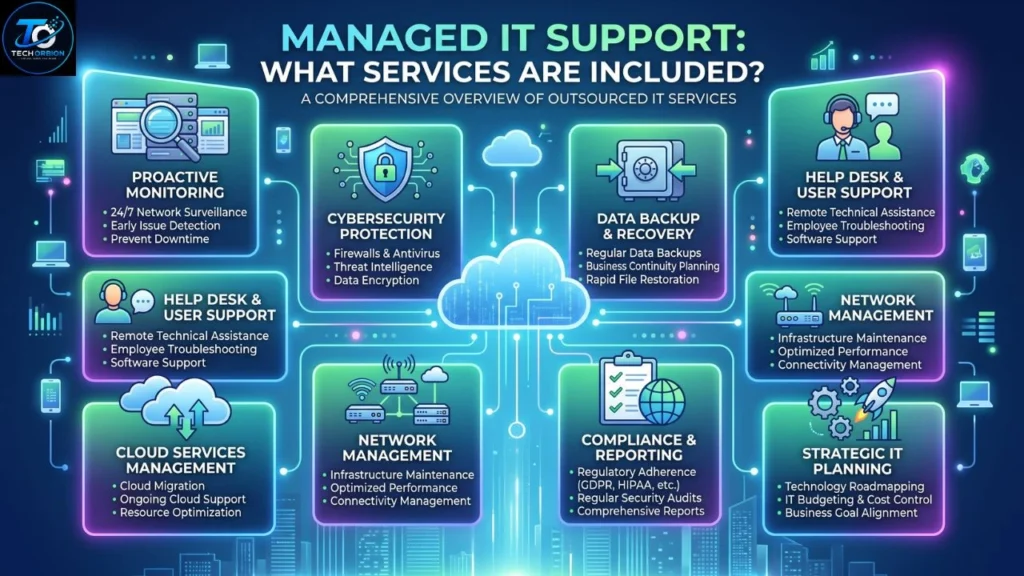
Managed IT support can cover many different areas. A small company may only need basic device and network support, while a larger company may need security, cloud management, backups, compliance help, and advanced monitoring.
Help Desk and Technical Support
A help desk gives employees a place to report technical problems. For example, a worker may have trouble connecting to Wi-Fi, installing software, accessing a shared folder, or resetting a password.
Instead of asking employees to solve complicated problems themselves, they can contact the support team. This can save time and reduce frustration.
Network and Device Monitoring
IT providers can monitor computers, servers, routers, switches, and other network equipment.
Monitoring can help identify issues such as:
- Devices going offline
- Network problems
- Storage running low
- Hardware failures
- Unusual system activity
- Performance problems
Finding an issue early can sometimes prevent a larger outage.
Cybersecurity
Security is an important part of modern IT management. Businesses face threats such as phishing, malware, ransomware, stolen passwords, and unauthorized access.
Security is an important part of modern IT management. Businesses can use cybersecurity practices to protect their devices, accounts, networks, and important data.
Managed IT providers may offer services such as endpoint protection, security monitoring, firewall management, multi-factor authentication support, and security awareness training.
However, businesses should not assume that hiring an MSP automatically makes them completely secure. Security depends on the provider’s tools, processes, staff training, and the business’s own policies.
Backup and Disaster Recovery
A backup is a copy of important data stored separately from the original.
Good backup planning is important because files can be lost through hardware failure, accidental deletion, malware, or other incidents.
Disaster recovery goes a step further. It explains how a business will restore systems and continue operating after a serious problem.
A strong plan should answer questions such as:
- What data is backed up?
- How often is it backed up?
- Where are backups stored?
- How quickly can data be restored?
- Who is responsible for recovery?
Cloud and Software Management
Many businesses use cloud services for email, file storage, collaboration, accounting, customer management, and other tasks.
A managed IT provider may help configure accounts, manage permissions, troubleshoot cloud applications, and keep software updated.
This can be especially useful when a business has employees working from different locations.
IT Planning and Consulting
Good IT support is not only about fixing today’s problems. A provider can also help a company plan for future technology needs.
For example, if a business plans to hire 20 new employees, an IT provider can help estimate the equipment, accounts, network capacity, security controls, and software licenses required.
Benefits and Drawbacks of Managed IT Support
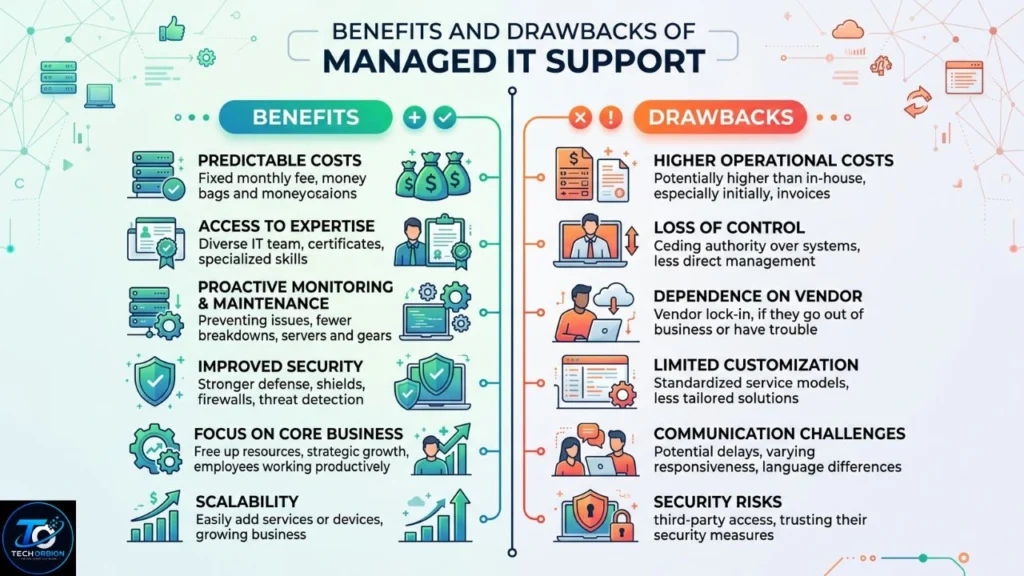
Managed IT services can provide major advantages, but they are not perfect for every business. Companies should understand both sides before signing an agreement.
Main Benefits
1. Predictable IT spending
Many managed services use a fixed monthly fee. This can make budgeting easier than paying unpredictable emergency repair bills.
2. Faster technical help
A support agreement normally gives employees a clear way to report problems. Some providers also offer different response times depending on the seriousness of an issue.
3. Proactive maintenance
Instead of waiting for a problem, the provider can monitor systems, apply updates, and look for warning signs.
4. Better security management
A good provider can help businesses improve security controls and maintain important protections.
5. Access to skilled professionals
Small companies may not be able to hire specialists in networking, cybersecurity, cloud services, and backup systems. An MSP can provide access to people with different technical skills.
6. More time for employees
When technology works properly, employees can spend more time on their actual jobs instead of troubleshooting computer problems.
Potential Drawbacks
Managed IT support also has disadvantages.
First, the business becomes dependent on an outside provider. If the provider gives poor service, technical problems may take longer to resolve.
Second, monthly costs continue even during periods when very little support is needed.
Third, not every provider offers the same level of service. A cheap package may have limited support hours, slow response times, or fewer security features.
Comparison Table
| Feature | Managed IT Support | Break-Fix IT | In-House IT Team |
| Payment | Usually monthly | Usually per issue | Employee salaries |
| Monitoring | Usually proactive | Often limited | Depends on team |
| Predictable costs | Often yes | Usually no | Partly |
| Internal expertise | External | External | Internal |
| Scalability | Usually flexible | Can be difficult | Depends on hiring |
| 24/7 support | Provider-dependent | Provider-dependent | Expensive to maintain |
| Best for | Many small and medium businesses | Occasional needs | Larger organizations |
How to Choose the Right IT Support Provider
Choosing an IT provider is an important business decision. Do not select a company only because it has the lowest monthly price.
Start by making a list of your current technology. Include computers, servers, cloud services, internet connections, business applications, security tools, and important data.
Then decide what kind of help you actually need.
Questions to Ask an IT Provider
Before signing a contract, ask:
- What services are included?
- What services cost extra?
- What are your support hours?
- How quickly do you respond to urgent problems?
- Do you provide cybersecurity monitoring?
- How do you handle backups?
- Do you test data restoration?
- What happens if your company has a security incident?
- Can you support remote employees?
- How do you protect customer data?
- Can I speak with existing customers?
- What happens when the contract ends?
Clear answers to these questions can help you avoid surprises later.
Check the Service Agreement
Read the agreement carefully before signing.
Look for information about response times, support hours, included services, additional charges, contract length, cancellation rules, data ownership, and responsibilities.
A good contract should clearly explain what the provider promises to do and what the customer is responsible for.
Do Not Ignore Security
Ask how the provider protects its own systems. This is important because an MSP may have administrative access to your company’s technology.
Ask whether the provider uses multi-factor authentication, access controls, security monitoring, employee training, and appropriate backup procedures.
You should also ask what happens if the provider itself suffers a security incident.
Start With Your Business Needs
Do not buy services simply because they sound impressive.
For example, a small company with ten employees may not need every advanced enterprise technology package. On the other hand, a company handling sensitive customer information may need stronger security controls than a basic support plan provides.
The right solution should match the company’s size, budget, industry, risks, and growth plans.
Managed IT Support vs. Other IT Support Options
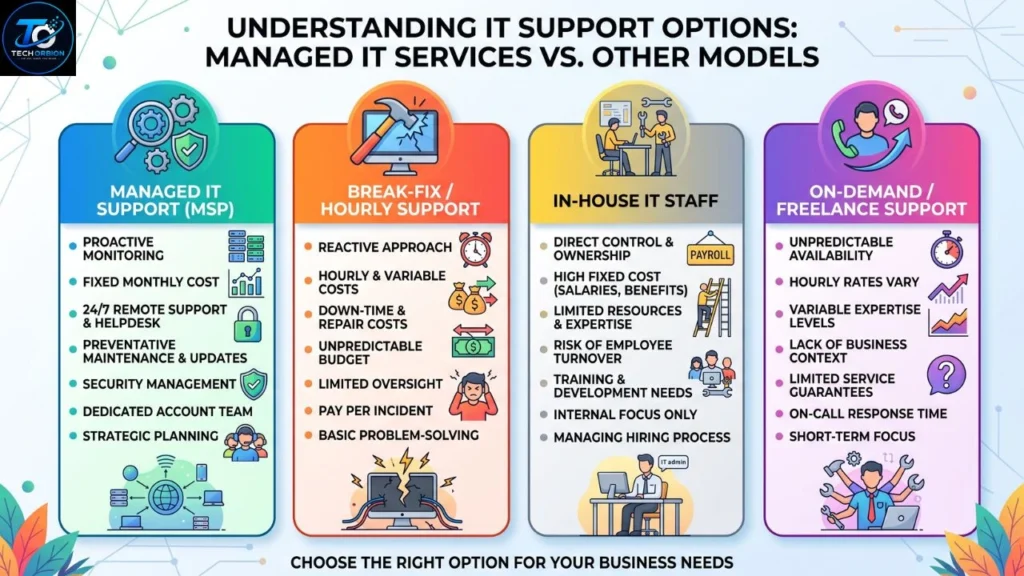
Businesses can manage technology in several ways. Managed services are only one option.
Managed Services
With managed services, an external provider handles agreed IT responsibilities continuously.
This is useful when a business wants ongoing support without building a large internal IT department.
Break-Fix Support
With break-fix support, the business contacts a technician when something goes wrong.
This can work for very small businesses with simple technology and few technical problems. However, it is less proactive because problems may only receive attention after they occur.
In-House IT
An in-house team consists of employees who work directly for the business.
This gives the company greater direct control and can be useful for organizations with complex technology needs. However, hiring experienced IT professionals can be expensive.
Hybrid IT
Some companies use a combination of internal employees and an external IT provider.
For example, an internal IT employee may handle daily support while an MSP manages cybersecurity, cloud systems, backups, or advanced network problems.
This can provide a useful balance between control and specialist expertise.
Practical Advice for Small Businesses
If you are a small business owner, start by identifying your biggest technology risks.
Small businesses can follow trusted cybersecurity guidance for small and medium-sized businesses to identify risks and improve their security practices.
Think about what would happen if:
- Your main computer failed tomorrow.
- Your business email stopped working.
- A ransomware attack encrypted your files.
- An employee lost a company laptop.
- Your internet connection failed for an entire day.
- Important customer data was accidentally deleted.
These questions can reveal where professional support would provide the most value.
A good IT strategy should focus on security, reliability, backups, user support, and business continuity rather than simply buying the most expensive technology.
Frequently Asked Questions About Managed IT Support
1. What is managed IT support?
Managed IT support is an ongoing service where an external IT provider manages agreed technology tasks for a business. Services may include support, monitoring, security, backups, and network management.
2. What is an MSP?
MSP stands for Managed Service Provider. It is a company that provides ongoing technology management and support to customers.
3. Is managed IT support good for small businesses?
Yes. Small businesses can use managed services to access IT skills without hiring a large internal technology team.
4. How much does managed IT support cost?
Prices vary based on company size, number of devices, services required, security needs, support hours, and contract terms. Businesses should compare the complete service rather than looking only at the monthly price.
5. What is included in managed IT services?
Common services include help desk support, network monitoring, software updates, cybersecurity, backups, cloud management, device management, and IT consulting.
6. Is managed IT support the same as cybersecurity?
No. Cybersecurity is one part of IT support. Some providers offer advanced security services, but businesses should confirm exactly what security features are included.
7. Can managed IT support prevent downtime?
It can reduce some types of downtime by monitoring systems, maintaining equipment, applying updates, and identifying problems early. However, no IT provider can guarantee that downtime will never happen.
8. Is managed IT support better than an in-house IT team?
It depends on the business. Managed services can be cost-effective for many small and medium businesses, while larger organizations may benefit from an internal team or a hybrid approach.
9. Can managed IT providers support remote workers?
Many providers can support remote employees through remote monitoring, cloud management, account support, security tools, and remote troubleshooting. The exact services depend on the provider.
10. What should I look for in a managed IT provider?
Look for clear contracts, good security practices, reliable support, transparent pricing, suitable response times, experienced technicians, strong backup procedures, and a good understanding of your business needs.
Conclusion
Managed IT support gives businesses a practical way to manage technology without handling every technical task themselves. A good provider can monitor systems, help employees, maintain networks, improve security, manage backups, and provide advice when the business grows.
The biggest advantage is the proactive approach. Instead of waiting for every problem to become an emergency, businesses can monitor systems and address many issues earlier. However, choosing the right provider is important. Businesses should compare services, security practices, response times, contracts, and total costs before making a decision.
For a small or growing company, managed IT support can be a useful alternative to building a large internal IT department. The best solution is the one that matches the company’s actual technology needs, risks, budget, and future plans.
