

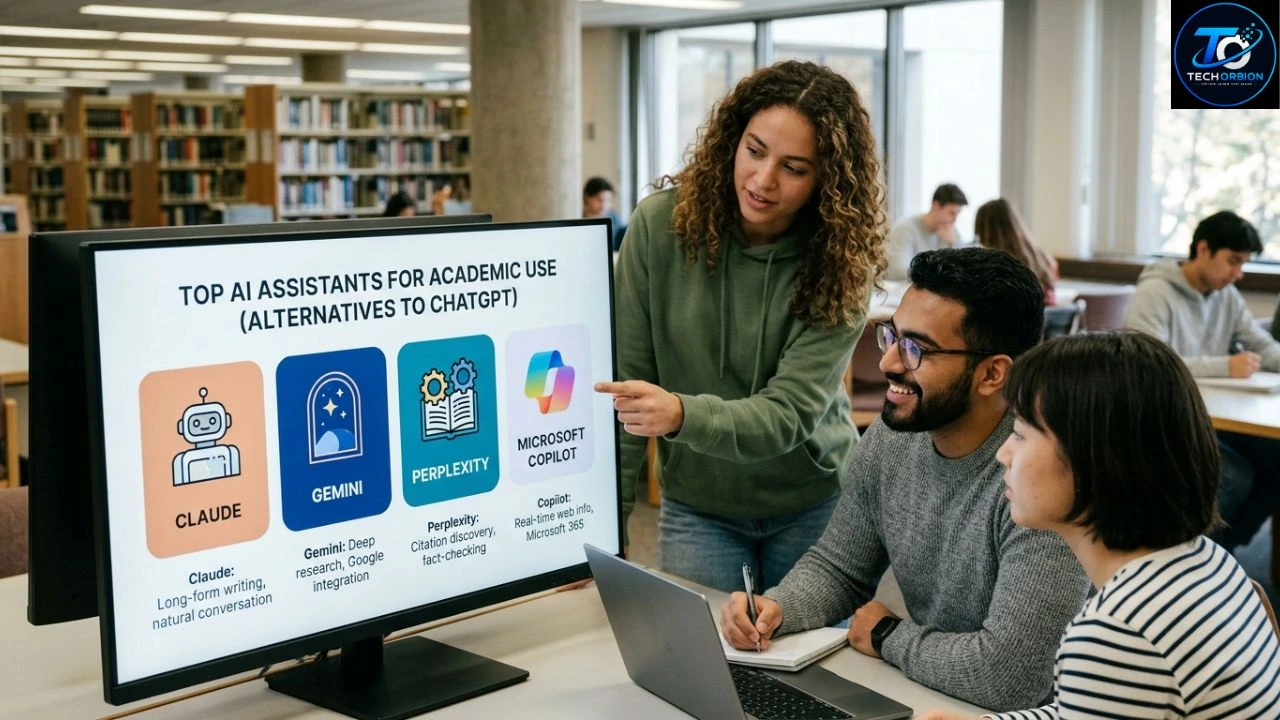
Looking for the best alternative to ChatGPT for students? The right choice depends on what you need help with. Some students want an AI tutor that explains hard topics. Others need help with research, long PDFs, writing, coding, or studying from class notes.
ChatGPT is a strong all-purpose tool, but it is not always the best fit for every school task. Tools such as Claude, Google Gemini, NotebookLM, Perplexity, Microsoft Copilot, Khanmigo, and Elicit each have different strengths.
The important thing is not to find the tool with the longest feature list. Instead, choose one that helps you understand your work, check information, and learn without doing the work for you. This guide compares the top options and explains which one is best for different student needs.
Table of Contents
- Why Students Look for ChatGPT Alternatives
- Best ChatGPT Alternatives for Students
- Comparison of the Top AI Study Tools
- How to Choose the Right AI Tool for School
- How Students Can Use AI Safely and Effectively
Why Students Look for ChatGPT Alternatives
ChatGPT can help students explain difficult topics, brainstorm ideas, summarize information, practice questions, and work through problems. But different AI tools are designed with different goals. Some are better at working with long documents, while others are stronger for research or guided learning.
ChatGPT can help students explain difficult topics, brainstorm ideas, summarize information, practice questions, and work through problems. But different AI tools are designed with different goals. Some are better at working with long documents, while others are stronger for research or guided learning. If you want to explore more student-focused AI tools, check out our guide to free AI tools for students.
Another reason students look for alternatives is accuracy. When you are writing a research paper, you need to know where information came from. A general chatbot may give you a useful explanation, but you should still check important facts against trusted sources. For research-heavy work, a tool that shows sources can be more useful.
Different Tools Work Better for Different Tasks
Imagine a student has a history exam next week. They have 100 pages of class notes and several PDF readings.
One tool might be good at explaining the topic. Another might be better at answering questions from the student’s own documents. A third might help find information on the web and provide sources.
This is why there is no single winner for every student. The best alternative to ChatGPT for students depends on the job.
For example:
- Learning difficult topics: Claude or Gemini
- Studying your own notes: NotebookLM
- Research and sources: Perplexity
- Math and guided learning: Khanmigo
- Academic research: Elicit
- General AI assistance: ChatGPT and its major alternatives
AI should be treated as a study helper, not as a replacement for your teacher, textbook, or your own thinking.
Best ChatGPT Alternatives for Students
Several AI tools stand out for students, but each has a different purpose. Below are the strongest options to consider.
1. Claude — Best for Learning and Writing Help
Claude, made by Anthropic, is a strong option for students who want help understanding complex ideas and improving written work. Anthropic has also built education-focused features around guided learning. Its Learning mode is designed to guide students through reasoning instead of simply giving them an answer.
This makes Claude useful when you want to learn how to solve a problem. For example, instead of asking it to write your entire essay, you could ask it to help you build an outline, point out weak arguments, and ask questions that make you think.
Claude can also be useful for working with long pieces of text. A student could provide a reading and ask for a simple explanation of difficult sections.
Best for: Writing help, explanations, long documents, brainstorming, and guided learning.
Main drawback: You should still verify facts and follow your school’s rules about AI use.
2. Google Gemini — Best for Students Using Google Tools
Google Gemini is worth considering if you already use Google services for school. Google has developed education-focused Gemini features designed around teaching and learning.
For students, one especially interesting option is Gemini Notebook, which Google describes as an AI research and thinking partner. It can work with materials you provide and create summaries, study guides, quizzes, flashcards, and other learning resources. Google says its education version can ground answers in uploaded sources and provide inline citations.
This can be useful when your study material is spread across documents and other class resources. Instead of asking a general chatbot about a topic, you can give the tool your own material and ask questions about it.
Best for: Students who use Google services, study guides, uploaded course materials, and source-based learning.
Main drawback: Features and access can vary depending on account type, age, school, and location.
3. NotebookLM — Best for Studying Your Own Notes
NotebookLM deserves special attention because it takes a different approach from a normal chatbot. Instead of mainly asking the AI about everything it knows, you provide the sources you want to study.
If you also want to explore dedicated flashcard and study platforms, see our guide to Quizlet alternatives
Google says NotebookLM can work with PDFs, websites, Google Docs, Slides, and other materials. It can then answer questions, create study guides, generate quizzes and flashcards, and provide citations connected to the sources you uploaded.
For example, imagine you have your teacher’s biology notes, a textbook chapter, and a class handout. You can put these materials into a notebook and ask questions about them. This can make it easier to stay focused on the material your class actually uses.
NotebookLM is also useful for revision. You can ask it to create practice questions based on your notes instead of simply asking for a summary.
Best for: Class notes, PDFs, revision, study guides, quizzes, and source-based learning.
Main drawback: It works best when you already have good source material. It is not a replacement for finding high-quality information.
4. Perplexity — Best for Research and Sources
Perplexity is a strong choice when your main goal is research. It is designed to search for information and provide answers with sources that you can check.
This can be useful for students working on research projects. Instead of receiving an answer with no clear source, you can follow the cited material and investigate it yourself.
For example, if you are writing about climate change, you could use Perplexity to find reports, research, and other relevant sources. You should still open the sources and read them instead of copying the AI’s answer into your assignment.
Best for: Research, finding sources, current information, and exploring unfamiliar topics.
Main drawback: AI summaries can still misunderstand sources. Always check the original material before using an important claim in academic work.
5. Khanmigo — Best for Guided Tutoring
Khanmigo is designed around learning and tutoring. Instead of simply giving students an answer, it can guide them through problems and encourage them to think.
This approach is especially useful for students who get stuck on math, science, or other subjects where understanding the steps matters.
For example, if you do not know how to solve an algebra problem, a good tutoring approach is to identify what you know, work through the first step, and then let you try the next one. This is much more useful for learning than copying a final answer.
Best for: Tutoring, guided practice, math, and learning through questions.
Main drawback: Availability and pricing can vary, so students should check the current official offering.
6. Elicit — Best for Academic Research
Elicit is designed for research rather than everyday homework questions. It can help students explore academic papers and organize information from research.
This makes it more useful for university students working on essays, dissertations, literature reviews, or research projects.
For example, instead of asking a general chatbot, “What research exists about sleep and learning?”, you can use a research-focused tool to help identify relevant academic papers and compare findings.
Best for: University research, literature reviews, academic papers, and finding research evidence.
Main drawback: It is more specialized, so younger students may find a general AI tutor easier to use.
7. Microsoft Copilot — Best for Microsoft Users
Microsoft Copilot can be useful for students who already work with Microsoft products. Depending on the version and account, Copilot can help with writing, summarizing, brainstorming, and other productivity tasks.
It can be particularly convenient when your schoolwork already happens in Microsoft’s ecosystem.
However, students should not assume that an AI-generated summary is automatically correct. Important facts and references should still be checked.
Best for: Students who use Microsoft tools for schoolwork and productivity.
Main drawback: Available features can differ between personal, school, and paid accounts.
Comparison of the Top AI Study Tools
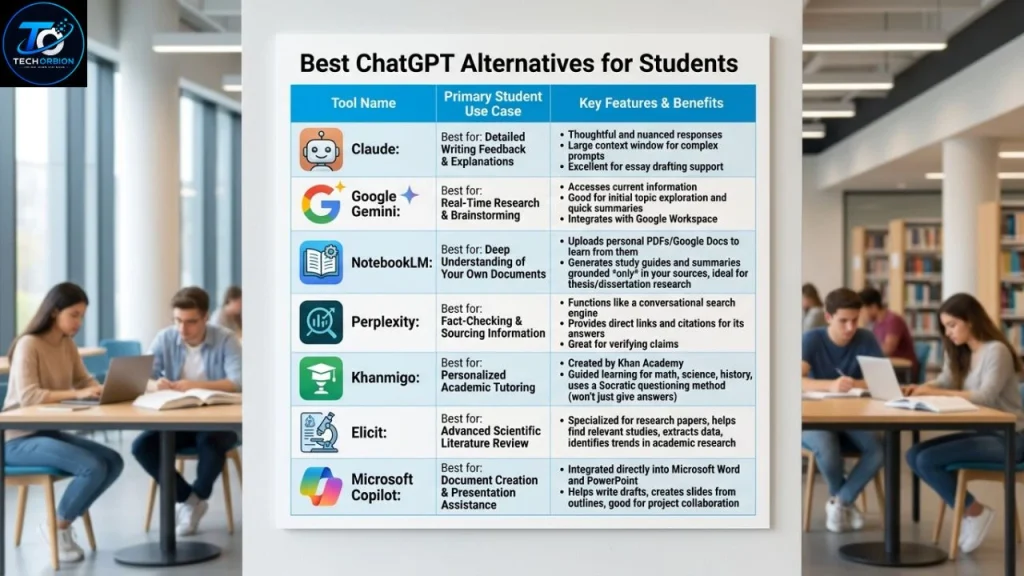
The following table gives you a simple overview of which tool may fit different student needs.
| AI Tool | Best For | Main Strength | Good Choice For |
|---|---|---|---|
| Claude | Learning and writing | Guided reasoning | School and university |
| Gemini | Google users | Google ecosystem | Students using Google tools |
| NotebookLM | Class materials | Source-based study | Notes and PDFs |
| Perplexity | Research | Search and sources | Research projects |
| Khanmigo | Tutoring | Guided learning | Math and practice |
| Elicit | Academic research | Research papers | University students |
| Copilot | Productivity | Microsoft ecosystem | Microsoft users |
Which One Is the Best Overall?
If you want one general-purpose alternative, Claude is a strong choice for students who care about explanations, writing, and guided learning.
If your biggest problem is studying from your own class material, NotebookLM may be the better choice. Google says it can generate study guides, quizzes, flashcards, and answers based on sources you provide.
For research, Perplexity is worth considering. For academic papers and literature reviews, Elicit is more specialized.
The right answer is therefore not simply “Which AI is smartest?” A better question is, “Which tool fits the work I need to do?”
How to Choose the Right AI Tool for School
Choosing an AI assistant becomes easier when you start with the task rather than the brand name.

Start With Your Main Goal
Ask yourself what you need help with.
If you need to understand a difficult lesson, choose a tool that can explain ideas step by step. If you need to study your own notes, choose a source-based tool. If you need research, use a platform that makes it easy to find and check sources.
A useful rule is:
Learn → Practice → Check.
First, use AI to understand the topic. Then try solving a problem or answering questions yourself. Finally, check your work against reliable sources.
Think About Accuracy
AI systems can make mistakes. They may produce a statement that sounds confident but is not correct.
This is sometimes called a hallucination. In simple terms, it means the AI gives information that is false, incomplete, or unsupported.
For schoolwork, this matters. If you are writing about history, science, medicine, or another fact-heavy subject, verify important information with textbooks, academic sources, official websites, or your teacher’s material.
Check Privacy Before Uploading Schoolwork
Do not upload sensitive information without understanding how a service handles your data.
For example, avoid sharing:
- Passwords
- Private student records
- Personal identification information
- Private messages
- Someone else’s confidential information
If you are using a school account, check your school’s rules before uploading documents.
Google says its education-focused Gemini Notebook is designed with additional safeguards for students, including different experiences for users under 18.
How Students Can Use AI Safely and Effectively
AI works best when it helps you learn rather than doing everything for you. A student who copies an AI answer may finish an assignment quickly but learn very little.
Instead, use AI as a tutor. Ask it to explain a difficult idea in simple words. Ask for practice questions. Ask it to check your reasoning. Ask for hints instead of the final answer.
Good Ways to Use AI
Here are practical examples:
- Ask for explanations: “Explain photosynthesis like I am 12 years old.”
- Practice: “Give me five algebra questions without answers.”
- Check your work: “Here is my solution. Show me where my reasoning went wrong.”
- Prepare for exams: “Make a practice quiz from these notes.”
- Improve writing: “Point out unclear sentences without rewriting the whole essay.”
- Understand research: “Explain the main argument of this paper in simple language.”
These uses help you become a better learner rather than simply producing finished work.
Common Mistakes to Avoid
One common mistake is asking an AI tool to complete an assignment from beginning to end. This may save time today, but it does not help you build the skills you will need later.
Another mistake is trusting every answer. Even the best AI tool can make errors. Always check important information.
You should also follow your school’s academic-integrity rules. Some teachers allow AI for brainstorming or feedback but do not allow students to submit AI-written work as their own.
Use More Than One Tool When It Makes Sense
You do not need to use seven AI tools every day. That can become confusing.
A simple combination may work better:
NotebookLM for your class notes → Claude for explanation and practice → Perplexity for finding additional sources.
For example, you could upload your history notes to NotebookLM, ask Claude to quiz you on difficult topics, and then use Perplexity to explore a historical question using sources you can check.
The goal is not to use more AI. The goal is to learn better.
Conclusion
The best alternative to ChatGPT for students depends on what you want to accomplish. Claude is a strong choice for explanations, writing support, and guided learning. Gemini works well for students who use Google’s ecosystem, while NotebookLM is excellent for studying your own notes and course materials. Perplexity is useful for research, Khanmigo focuses on tutoring, and Elicit is designed for academic research.
No AI tool should replace your own thinking. The safest and most useful approach is to use AI to explain, quiz, guide, and provide feedback while you do the actual learning. Check important facts, protect private information, and follow your school’s AI rules.
The best tool is the one that helps you understand more, not simply the one that gives you an answer fastest.
Frequently Asked Questions
1. What is the best alternative to ChatGPT for students?
There is no single best option. Claude is a strong general choice for explanations and learning, while NotebookLM is especially useful for studying your own notes and PDFs.
2. Is there a free alternative to ChatGPT for students?
Yes. Several AI platforms offer free access or free features, although limits can vary by service, account type, age, and location. Always check the current official pricing and access rules.
3. Which AI is best for studying from PDF files?
NotebookLM is one of the strongest options for this use because it is designed around uploaded sources. Google says it can answer questions about provided materials and create study guides, quizzes, and flashcards.
4. Which AI is best for research papers?
Perplexity can help with finding information and sources, while Elicit is more specialized for academic research and papers. In either case, open and check the original sources before using them in an assignment.
5. Can students use AI for homework?
It depends on the school’s or teacher’s rules. AI can be useful for explanations, practice, brainstorming, and feedback, but students should not submit AI-generated work as their own when that violates academic rules.
